How To Preheat A Thinq Oven Fast And Easy At Home Today
Preheating a Thinq oven is simple and fast when you know the right steps. This guide walks you through every method, setting, and tip to get your Thinq oven ready in minutes. You will learn how to use smart features, avoid common mistakes, and troubleshoot preheat issues like a pro.
There is nothing worse than putting your food into an oven that is not ready. Whether you are baking cookies, roasting vegetables, or cooking a steak, the Thinq oven preheat process sets the foundation for everything that follows. A properly preheated oven cooks food evenly, creates the right texture, and locks in flavor. The good news is that preheating a Thinq oven is one of the easiest things you can do in the kitchen.
LG’s ThinQ line of smart ovens comes packed with features that make preheating faster and more convenient than ever. From the intuitive control panel to the LG ThinQ app on your phone, you have multiple ways to get your oven up to temperature. In this guide, we will walk you through every method, share expert tips, and help you avoid the mistakes that slow people down. By the end, you will know exactly how to preheat a Thinq oven fast and easy at home today.
The Thinq oven preheat process might seem straightforward, but there is more to it than just pressing a button. Understanding your oven’s settings, knowing how long to wait, and recognizing when something is wrong can make a big difference in your cooking. This guide covers it all. Let us dive in.
Key Takeaways
- Fast Preheat Mode: The Thinq oven has a dedicated fast preheat feature that cuts waiting time in half compared to traditional preheating.
- Smart App Control: You can start preheating remotely using the LG ThinQ app on your phone before you even walk into the kitchen.
- Temperature Accuracy Matters: Using an oven thermometer ensures your Thinq oven reaches the exact temperature you need for great cooking results.
- Common Mistakes Are Easy to Avoid: Skipping the preheat, opening the door too often, and overloading the oven are the top errors that ruin your cooking.
- Troubleshooting Is Simple: Most preheat problems with a Thinq oven have easy fixes you can do at home without calling a technician.
- Convection Preheats Faster: Using the convection setting on your Thinq oven reduces preheat time and distributes heat more evenly.
📑 Table of Contents
- Understanding Your Thinq Oven Preheat Settings
- Step-by-Step: How To Preheat A Thinq Oven Fast
- How Long Does It Take To Preheat A Thinq Oven
- Common Mistakes When Preheating A Thinq Oven
- Thinq Oven Preheat Troubleshooting
- Tips for Perfect Results After Preheating
- Why Preheating Your Thinq Oven Matters
- Expert Insights: Getting the Most From Your Thinq Oven Preheat
- Frequently Asked Questions
- Conclusion
Understanding Your Thinq Oven Preheat Settings
Before you start preheating, it helps to know what your Thinq oven can do. LG designed the ThinQ line with smart technology that gives you more control over temperature and cooking modes. The preheat function is no exception.
The Control Panel
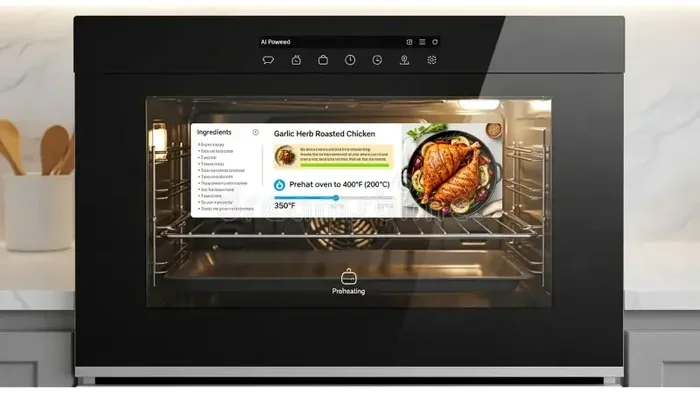
The front panel of your Thinq oven is where everything begins. You will find a digital display, temperature buttons, mode selectors, and a preheat button. The layout is clean and easy to understand. Most models have a dedicated Preheat button that takes you straight to the function without navigating through menus.
To use the control panel for preheating:
- Press the Preheat button on the panel.
- Use the temperature arrows to set your desired heat level.
- Press Start to begin the preheat cycle.
- The display will show a countdown or temperature progress bar.
That is all there is to it. The oven will heat up and beep or flash when it reaches the target temperature. This is the most common way people preheat their ThinQ ovens, and it works great for everyday cooking.
The LG ThinQ App
The LG ThinQ app is one of the standout features of these smart ovens. You can control your oven from anywhere in your house or even when you are not home. The app lets you start preheating remotely, so your oven is ready by the time you walk through the door.
Here is how to use the app for preheating:
- Download the LG ThinQ app on your smartphone.
- Connect your oven to your home Wi-Fi network.
- Open the app and select your oven.
- Tap the Preheat option.
- Set your desired temperature and start the cycle.
This is incredibly useful when you are running errands and want dinner to be ready the moment you arrive. The Thinq oven preheat feature through the app saves real time and makes cooking more convenient.
Convection vs. Regular Preheat
Your ThinQ oven likely offers both convection and regular preheat modes. Understanding the difference helps you choose the right one for each meal.
Convection preheat uses a fan to circulate hot air throughout the oven cavity. This means the heat reaches every corner faster. Convection preheating is typically 20 to 30 percent faster than regular preheat. It also creates a more even temperature, which is great for baking and roasting.
Regular preheat relies on the heating elements at the top and bottom of the oven without the fan. This mode works well for dishes that need a gentler, more static heat environment. Some recipes specifically call for regular preheat, so always check before you switch modes.
| Feature | Convection Preheat | Regular Preheat |
|---|---|---|
| Speed | Faster (fan-assisted) | Standard speed |
| Heat Distribution | Even throughout | Top and bottom focused |
| Best For | Baking, roasting, multiple dishes | Delicate dishes, casseroles |
| Preheat Time | Shorter | Longer |
| Energy Use | Slightly higher | Standard |
Step-by-Step: How To Preheat A Thinq Oven Fast
Now that you understand the settings, let us walk through the actual preheat process step by step. Whether you are using the control panel or the app, the steps are simple and straightforward.
Method 1: Quick Preheat Using the Control Panel
This is the fastest way to preheat your Thinq oven when you are standing right in front of it.
- Make sure the oven is empty and the racks are in position.
- Press the Preheat button on the control panel.
- Select your temperature using the up and down arrows. Most recipes call for 350°F or 375°F, but check your specific recipe.
- Press Start.
- Wait for the signal. The oven will beep or the display will show a checkmark when it is ready.
The entire process usually takes between 5 and 10 minutes depending on the target temperature. Using convection mode during preheat can shave a few minutes off that time.
Method 2: Remote Preheat Using the ThinQ App
This method is perfect for busy days when you want to save time.
- Open the LG ThinQ app on your phone.
- Select your oven from the device list.
- Choose the Preheat function.
- Set the temperature you need.
- Tap Start and walk away.
By the time you get home, your oven will be at the right temperature and ready for your food. This is one of the biggest advantages of owning a smart Thinq oven. You do not have to wait around in the kitchen.
Method 3: Using a Custom Preheat Program
Some Thinq oven models allow you to save custom preheat programs. This is helpful if you cook the same dishes regularly and want a one-touch preheat experience.
To set up a custom program:
- Go to the oven settings through the control panel or app.
- Select Custom Programs or My Recipes.
- Create a new program with your preferred preheat temperature and time.
- Save it and give it a name like “Pizza Night” or “Sunday Roast.”
Next time you need to preheat, just select your saved program and the oven does the rest. This is a small feature that saves a lot of time over the long run.
How Long Does It Take To Preheat A Thinq Oven
The Thinq oven preheat time depends on several factors. Knowing what to expect helps you plan your cooking better and avoid frustration.
Average Preheat Times
Here is a general breakdown of how long a Thinq oven takes to reach common temperatures:
- 350°F: About 5 to 7 minutes with convection, 8 to 10 minutes with regular preheat.
- 375°F: About 7 to 9 minutes with convection, 10 to 12 minutes with regular preheat.
- 400°F: About 9 to 11 minutes with convection, 12 to 15 minutes with regular preheat.
- 425°F: About 11 to 13 minutes with convection, 14 to 17 minutes with regular preheat.
These times are based on a fully functioning oven at room temperature. If your oven is cold from being turned off for a while, it may take a bit longer. If you are using the fast preheat mode, expect the times to be on the lower end of these ranges.
Factors That Affect Preheat Time
Several things can make your Thinq oven preheat faster or slower:
- Oven Size: Larger oven cavities take more time to heat up.
- Starting Temperature: A cold oven takes longer than one that was recently used.
- Convection Fan: Turning on the convection fan speeds up the process significantly.
- Door Opening: Every time you open the door, heat escapes and the oven has to recover.
- Rack Position: Racks placed in the center allow the best airflow and faster heating.
Keeping these factors in mind helps you get the most out of your Thinq oven preheat cycle every single time.
Common Mistakes When Preheating A Thinq Oven
Even experienced cooks make mistakes when preheating. Here are the most common ones and how to avoid them.
Skipping the Preheat Entirely
Some people put food in the oven before it reaches the target temperature. This is one of the biggest mistakes you can make. Food cooked in a cold oven takes longer to cook, cooks unevenly, and often turns out soggy or underdone. Always wait for the Thinq oven signal that it is ready before you add your food.
Opening the Door Too Often
It is tempting to peek inside the oven to check on the preheat progress. Every time you open the door, you let out a significant amount of heat. The oven then has to work harder to recover the temperature. This extends the preheat time and wastes energy. Trust the display or the app notification and wait until the signal sounds.
Overloading the Oven Before Preheating
Placing too much food or cookware inside the oven before it preheats blocks airflow and slows down the heating process. Always preheat with the oven empty. Once it reaches temperature, you can quickly load your food inside.
Not Using the Right Preheat Mode
Using regular preheat when a recipe calls for convection (or vice versa) affects your results. Make sure you select the correct mode for what you are cooking. When in doubt, convection preheat is a safe and fast choice for most dishes.
Ignoring the Oven Thermometer
Even smart ovens can have slight temperature variations. An oven thermometer is a cheap and useful tool that tells you the actual temperature inside your Thinq oven. This is especially helpful if you notice your food is consistently overcooked or undercooked.
Thinq Oven Preheat Troubleshooting
What happens when your Thinq oven does not preheat properly? Most issues have simple solutions. Here is what to check.
The Oven Is Not Heating Up
If the oven does not seem to be heating at all, start with the basics. Make sure the oven is plugged in and the circuit breaker has not tripped. Check that the control panel is responding and that you have pressed Start after setting the temperature. Sometimes a simple reset fixes the problem. Turn the oven off, wait 30 seconds, and turn it back on.
The Oven Is Heating but Not Reaching the Target Temperature
This can happen if the oven is losing heat through a gap or if the door seal is worn. Check the door gasket for any visible damage or gaps. If the seal looks fine, try using an oven thermometer to compare the displayed temperature with the actual temperature inside the cavity. If there is a significant difference, the oven may need calibration.
The Preheat Takes Too Long
If your Thinq oven preheat is consistently slower than expected, several things could be at play. The oven might be in a higher-wattage mode that heats more gradually. The racks might be blocking airflow. Or the oven might be in a very cold room. Try removing unnecessary racks, ensuring nothing is blocking the vents, and preheating in convection mode for faster results.
The Oven Beeps but Food Cooks Unevenly
This usually points to a temperature distribution issue. Make sure you are using the convection fan for more even heating. Rotate your pans halfway through cooking if needed. Also check that the oven is level, as an unlevel oven can cause heat to pool on one side.
For more oven care tips, check out our guide on how to clean your oven properly to keep it running efficiently. If you are wondering about using accessories inside the oven, we also cover whether you can put a plate in the oven safely.
Tips for Perfect Results After Preheating
Preheating is only the first step. How you use the preheated oven matters just as much. Here are some tips that help you get the best results every time.
Load Food Quickly
Once your Thinq oven reaches the target temperature, put your food in right away. The longer you wait, the more heat escapes and the more the oven has to work to recover. Have your food prepared and ready to go before you start the preheat cycle.
Use the Right Bakeware
The type of pan or baking sheet you use affects cooking results. Dark pans absorb more heat and can cause food to brown faster. Light-colored pans reflect heat and cook more gently. When preheating for baking, choose your bakeware wisely.
Position Racks Correctly
Place racks in the center of the oven for the most even heat distribution. If you are cooking multiple dishes at once, stagger the racks to allow air to flow between them. This is especially important when using convection preheat mode.
Keep the Oven Clean
A clean oven preheats more efficiently. Food residue and grease on the oven walls can absorb heat and slow down the preheat process. Regular cleaning keeps your Thinq oven performing at its best. For toaster oven owners, we also have a guide on whether parchment paper is safe in the oven that covers oven-safe materials.
Plan Your Cooking Around Preheat Time
Use the preheat time wisely. While the oven is heating up, prepare your ingredients, mix your batter, or season your meat. This way, the moment the oven beeps, you are ready to go. It is a simple habit that makes cooking smoother and more enjoyable.
When you are ready to cook after preheating, recipes like Omaha steak burgers or filet mignon in the oven work beautifully in a properly preheated Thinq oven. And for sides, knowing how long potatoes take to cook in a preheated oven helps you plan a complete meal.
Why Preheating Your Thinq Oven Matters
Some people skip preheating to save a few minutes. But that shortcut costs you in quality. Here is why taking the time to preheat your Thinq oven properly makes a real difference.
When food hits a hot oven immediately, the surface sears quickly. This creates a golden crust on bread, a crispy exterior on roasted vegetables, and a beautiful sear on meats. In a cold oven, food steams instead of searing, and you lose that appealing texture.
Preheating also affects cooking time. Food cooks faster in a preheated oven because it does not have to wait for the oven to catch up. This means your food spends less time cooking and more time retaining moisture and nutrients.
For baked goods, preheating is absolutely essential. Cakes, cookies, and breads rely on the sudden burst of heat to rise properly. A cold oven leads to flat, dense results. If you love baking, the Thinq oven preheat function is your best friend.
Beyond the food itself, preheating also improves energy efficiency. A preheated oven reaches the target temperature faster and maintains it more consistently. This means your oven does not run as long, which saves a small amount of energy over time.
Expert Insights: Getting the Most From Your Thinq Oven Preheat
We asked experienced home cooks and kitchen professionals for their best advice on using the Thinq oven preheat feature. Here is what they shared.
Always preheat for at least 5 minutes, even for quick recipes. The oven needs time for the heat to stabilize throughout the cavity. A beep does not always mean the entire oven is at a uniform temperature.
Use the app to preheat during your morning routine. If you know dinner will be at 6 PM, start preheating at 5:45 PM from your phone. By the time you finish cooking prep, the oven is ready.
Invest in an oven thermometer. Even the best smart ovens can drift by 10 to 15 degrees. A simple thermometer takes the guesswork out and gives you confidence in your cooking.
Do not preheat for too long. If you preheat and then wait 20 minutes before putting food in, the oven loses significant heat. Preheat right before you are ready to cook.
Use the convection setting for roasting and baking. The fan-assisted heat preheats faster and cooks more evenly. This is the go-to mode for most cooking tasks.
Frequently Asked Questions
How long does it take to preheat a Thinq oven to 350 degrees?
It typically takes 5 to 7 minutes using convection preheat mode and 8 to 10 minutes using regular preheat mode. The exact time depends on the oven model, starting temperature, and whether the oven is empty. Always wait for the signal before loading your food.
Can I use the ThinQ app to preheat my oven from outside the house?
Yes, you absolutely can. As long as your oven is connected to Wi-Fi and the ThinQ app is set up, you can start the preheat cycle remotely. This is one of the most convenient features of a Thinq smart oven. Just make sure the oven is empty and safe before starting it remotely.
Why is my Thinq oven not reaching the preheat temperature?
This can happen if the door seal is damaged, the heating element is malfunctioning, or the oven needs recalibration. Start by checking the door gasket for gaps and running a reset. If the problem continues, consult the user manual or contact LG support for assistance.
Should I preheat with or without food inside the oven?
Always preheat with the oven empty. Placing food or cookware inside before the oven reaches temperature blocks airflow and slows down the heating process. Wait for the preheat signal, then load your food quickly for the best results.
Is convection preheat better than regular preheat for most cooking?
For most cooking tasks, yes. Convection preheat uses a fan to distribute heat faster and more evenly. It works well for baking, roasting, and cooking multiple dishes at once. Some delicate recipes like souffles may call for regular preheat, so always check your recipe first.
How do I know when my Thinq oven has finished preheating?
The oven will beep or flash a notification on the control panel when it reaches the target temperature. If you are using the ThinQ app, you will receive a push notification on your phone. Some models also display a checkmark or “Ready” message on the screen.
Conclusion
Preheating a Thinq oven is fast, simple, and one of the most important steps in cooking. Whether you use the control panel, the ThinQ app, or a custom program, the process is designed to be easy and efficient. Understanding your oven’s settings, knowing how long to wait, and avoiding common mistakes will dramatically improve your cooking results.
The Thinq oven preheat feature gives you more control and convenience than traditional ovens. With remote preheat capability, convection speed, and smart notifications, your Thinq oven does the hard work so you do not have to. Take a few minutes to practice the steps in this guide, and soon preheating will feel like second nature.
Remember to preheat every time you cook, use the right mode for your dish, and trust the process. A well-preheated oven is the secret ingredient behind every great meal. Start using these tips today and enjoy the difference in your cooking from the very first dish.