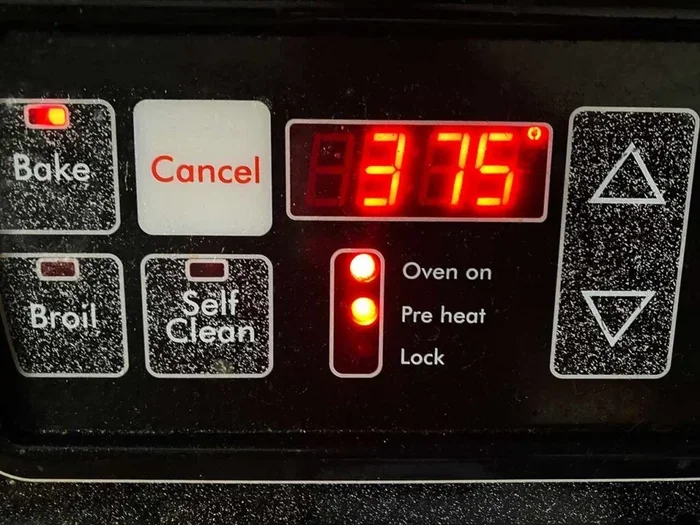
What Is The Preheat Symbol On An Oven And How To Use It
The preheat symbol on an oven is a small icon that tells you your cooking appliance is warming up to the right temperature before you put food inside. Understanding this symbol helps you bake, roast, and cook food more evenly and safely. Whether you have a gas oven, electric oven, or convection oven, knowing how to read and use the preheat indicator saves time and improves your cooking results.
Have you ever stood in front of your oven, staring at a tiny symbol you have never seen before? You are not alone. Many home cooks wonder what that small icon on the oven display or dial actually means. The preheat symbol on oven panels is one of those small details that can make a big difference in how your food turns out.
Preheat symbol on oven indicators are simple but powerful tools. They tell you exactly when your oven has reached the right baking temperature. Without them, you would be guessing. And guessing leads to undercooked or overcooked meals.
In this guide, we will break down everything you need to know about the preheat symbol on oven controls. You will learn what each icon looks like, how to use it, and why preheating matters so much for your meals. Whether you are a beginner or a seasoned cook, this article will help you get better results every time you use your cooking appliance.
Key Takeaways
- The preheat symbol looks different on every oven: It can be a flame icon, a thermometer shape, or the letters “PrE” on the display.
- Preheating ensures even cooking: Food cooks better when the oven reaches the right baking temperature before you add it.
- The preheat cycle usually takes 10 to 20 minutes: Wait for the ready signal or light before placing food inside.
- Not all ovens show the same icon: Different brands use different oven symbols, so check your manual.
- Skipping preheating leads to uneven results: Cold starts cause longer cooking times and poor texture.
- Convection ovens preheat faster: The fan helps distribute heat more quickly than a standard thermal oven.
- Always trust the preheat indicator: The oven beep or display message confirms your cooking appliance is ready.
📑 Table of Contents
What Does the Preheat Symbol Look Like?
The preheat symbol on oven controls varies from one brand to another. There is no single universal design. But most oven symbols fall into a few common categories. Once you learn to recognize them, you will never have to guess again.
Some ovens use a simple flame shape. Others show a small thermometer. Modern digital ovens may display the letters “PrE” or “PRE” on the digital display. Each one means the same thing: your oven preheat cycle has started.
Common Preheat Icons Across Different Oven Brands
Let us look at the most common oven icon designs you might see:
- Flame Icon: This is the most classic preheat indicator. A small flame symbol means the oven is heating up. You will often find this on older models and basic oven settings.
- Thermometer Shape: Many ovens use a thermometer-like symbol. The line inside rises as the temperature increases. When it reaches the target, the symbol changes or a light turns off.
- Letters “PrE” or “PRE”: Modern ovens with digital displays often show these letters during the preheat cycle. The display usually clears or changes once the oven is ready.
- Temperature Number: Some ovens simply show the target baking temperature on the screen. A blinking number means the oven is still warming up. A steady number means it is ready.
- Progress Bar: High-end ovens may show a filling bar. The bar fills up as the heat up time passes. When it reaches 100%, your oven is ready.
No matter which style your oven uses, the purpose is the same. The preheat symbol on oven gives you a visual signal that your appliance is working toward the right temperature.
Why Preheating Your Oven Is So Important
Some people skip preheating. They put food in a cold oven and wait. But this approach has real downsides. Understanding the science behind preheating can change the way you cook.
The Science Behind Preheating
When you turn on your cooking appliance, the heating elements start warming the air inside. But it takes time for that heat to spread evenly throughout the oven cavity. The thermal sensor monitors the air temperature and signals the preheat indicator when the target is reached.
Here is why that matters:
- Even Cooking: A preheated oven surrounds food with consistent heat from all sides. This leads to even browning and cooking.
- Better Texture: Bread, pastries, and cakes rely on a sudden burst of heat to rise properly. A cold oven delays this process and affects the final texture.
- Accurate Timing: Recipe times assume a preheated oven. Starting with a cold oven means your food needs more time, which can dry it out.
- Food Safety: Certain foods, especially meats and casseroles, need to reach a safe internal temperature quickly. Preheating helps with this.
Think of it like a warm bath versus a cold one. You would not jump into a freezing pool and expect to feel comfortable right away. Your food works the same way. Giving it a hot environment from the start makes a huge difference.
The preheat symbol on oven controls is your guide. It tells you when the environment is ready for your food. Trusting that symbol leads to better meals.
How To Use the Preheat Symbol on Your Oven
Using the preheat symbol on oven is simple once you know the steps. Let us walk through the process together.
Step-by-Step Instructions
- Check the Symbol: Look at your oven’s control panel or dial. Find the preheat symbol. It might be a flame, thermometer, or the letters “PrE”.
- Set Your Temperature: Use the temperature dial or digital controls to set the desired baking temperature. Most recipes give you a specific number.
- Start the Preheat: Press the start button or turn the dial to begin the preheat cycle. The preheat indicator will light up or appear on the oven display.
- Wait for the Ready Signal: Watch for the ready signal. This could be a steady light, a beep, or the symbol turning off. On digital models, the temperature number will stop blinking.
- Place Your Food Inside: Once the oven beep sounds or the symbol changes, your cooking appliance is ready. Quickly place your food on the oven rack and close the door.
- Set the Timer: Start your cooking timer based on the recipe. Since your oven is already at the right bake mode temperature, the timing will be accurate.
That is all there is to it. The whole process usually takes between 10 and 20 minutes, depending on your oven type and the target temperature.
Quick Tips for Better Preheating
- Keep the oven door closed: Every time you open the door, heat escapes and the preheat cycle resets.
- Use an oven thermometer: Built-in sensors are not always perfectly accurate. A standalone oven thermometer can help you verify the real temperature inside.
- Preheat for at least 10 minutes: Even if the ready signal comes on quickly, giving the oven a few extra minutes helps stabilize the heat.
- Place food on the center rack: This position allows the best heat distribution for most recipes.
Common Oven Symbols and What They Mean
Ovens are full of small icons and symbols. Beyond the preheat symbol on oven controls, there are many other indicators that can confuse people. Let us decode the most common ones.
How To Read Your Oven Display
Modern ovens use a combination of symbols and text on the digital display or analog dial. Here are some symbols you will likely encounter:
- Top Heat Only: A zigzag line at the top of the oven cavity. This is used for broiling and browning the top of dishes.
- Bottom Heat Only: A zigzag line at the bottom. This is the traditional bake mode setting for pizzas and breads.
- Fan with Heat: A fan icon with a curved line. This means your convection oven is on. The fan circulates hot air for faster, more even cooking.
- Defrost Symbol: A snowflake or ice crystal icon. This turns off the heat and uses only the fan for thawing.
- Light Icon: A small lightbulb symbol. This turns on the interior oven light so you can check on your food without opening the door.
Knowing these symbols helps you navigate your oven settings with confidence. The preheat symbol on oven is just one part of a larger system of controls that work together to give you the perfect cooking environment.
If your oven manual has a symbol chart, keep it handy. Many people throw those manuals away, but they are a goldmine of useful information. You can also find PDF versions online by searching for your oven model number.
Mistakes People Make When Using the Preheat Feature
Even experienced cooks make mistakes with the preheat symbol on oven controls. Let us look at the most common ones and how to avoid them.
Quick Tips to Avoid Them
- Opening the Door Too Often: Every peek lets heat escape. This extends the heat up time and wastes energy. Trust the ready signal and wait until you truly need to open the door.
- Not Waiting Long Enough: Some people see the preheat indicator turn off and immediately load food. But the oven walls and racks may still be warming up. Wait an extra 2 to 3 minutes for best results.
- Overcrowding the Oven: Placing too many dishes inside blocks heat distribution. This affects the baking temperature and leads to uneven cooking. Give each dish enough space.
- Ignoring the Oven Thermometer: Your oven’s built-in sensor can drift over time. A cheap oven thermometer placed inside can reveal if your cooking appliance is running hot or cold.
- Forgetting to Turn Off the Preheat: Some ovens stay in preheat mode until you set a cooking function. If you forget, the oven continues heating past your target temperature dial setting.
Avoiding these simple mistakes will improve your cooking results and extend the life of your oven. The preheat symbol on oven is there to help you. Working with it, not against it, makes everything easier.
Does Every Oven Have a Preheat Symbol?
Most modern ovens include some form of preheat indicator. But the style and placement vary widely. Let us explore what happens when your oven does not show a clear symbol.
What If Your Oven Doesn’t Show One?
Older ovens may not have a digital display or a visible preheat symbol on oven panel. Instead, they might rely on a simple light near the temperature dial. When the light turns off, the oven has reached the set temperature.
Some basic oven settings on older models do not have any indicator at all. In these cases, you can use a standalone oven thermometer to check the internal temperature. Place it inside the oven during the preheat cycle and watch for your target baking temperature.
If you recently bought a new oven and cannot find the preheat symbol, check the user manual. The oven icon might be labeled differently than what you expect. Manufacturers sometimes use creative designs that are not immediately obvious.
For convection oven models, the preheat process is slightly different. The fan runs during preheating, which speeds up the heat up time. The preheat indicator on convection ovens often includes a fan symbol alongside the standard preheat icon.
No matter what type of cooking appliance you own, the goal is the same. You want the oven to reach the right bake mode temperature before your food goes in. The preheat symbol on oven is simply the visual tool that tells you when that moment has arrived.
Taking a few extra minutes to understand your oven’s symbols pays off every time you cook. Better results, fewer mistakes, and more confidence in the kitchen. That is what the preheat symbol on oven is really all about.
Conclusion
The preheat symbol on oven is one of the smallest features on your cooking appliance, but it plays a huge role in how your food turns out. It tells you when the oven has reached the right baking temperature and is ready for your recipe. Once you learn to recognize the different oven symbols and understand what they mean, you will cook with more confidence and better results.
Remember to always wait for the ready signal before placing food inside. Avoid opening the door too often during the preheat cycle. And if your oven does not show a clear preheat indicator, use a standalone oven thermometer to verify the temperature.
Preheat symbol on oven controls are designed to make your life easier. They take the guesswork out of cooking and help you achieve consistent, delicious meals. So next time you see that small icon on your oven display, you will know exactly what it means and how to use it to your advantage.
Start paying attention to the preheat symbol on oven today. Your meals will taste better, cook more evenly, and look more professional. It is a small change that makes a big difference in your kitchen.
Frequently Asked Questions
What does the preheat symbol look like on a typical oven?
The preheat symbol on oven controls usually looks like a small flame, a thermometer shape, or the letters “PrE” on a digital display. Some ovens show a blinking temperature number or a filling progress bar. Each design serves the same purpose: letting you know the oven is warming up to the right baking temperature.
How long does the preheat cycle usually take?
Most ovens take between 10 and 20 minutes to complete the preheat cycle. The exact heat up time depends on the oven type, the target temperature, and whether you have a convection oven or a standard model. Higher temperatures generally require more time.
Can I put food in the oven before the preheat symbol goes off?
You should wait for the ready signal before placing food inside. The preheat indicator tells you the oven has reached the set baking temperature. Putting food in too early leads to uneven cooking and longer overall cooking time.
Do all ovens have a preheat symbol?
Most modern ovens include some form of preheat indicator, whether it is a light, a symbol, or a display message. Older or basic models may not have a visible oven icon for preheating. In those cases, an oven thermometer can help you track the internal temperature.
Why is my oven preheating so slowly?
A slow preheat cycle can be caused by a few factors. The oven door may be opening too often, which lets heat escape. The thermal sensor might be malfunctioning. Or the heating elements could be wearing out. If your cooking appliance consistently takes longer than 20 minutes to preheat, it may need professional inspection.
Does preheating really make a difference in cooking results?
Yes, preheating makes a significant difference. A preheated oven provides immediate, even heat that helps food cook properly from the start. This is especially important for bread, pastries, and baked goods that rely on a burst of heat to rise. The preheat symbol on oven ensures you are not starting your recipe too early.